
Get started
    API Endpoint

         "<datazapp api endpoint URL>"
An Email Append Service enriches your contact information by adding email addresses through a matching process with the 400 million Email database. It’s important to note that the matched emails are not verified; we recommend using our email verification API for that purpose.
To use this API, you need an API key. Please contact us at [email protected] to get your API key.
File Upload API URL Request
< API Endpoint :-datazapp api endpoint URL>Sample Request
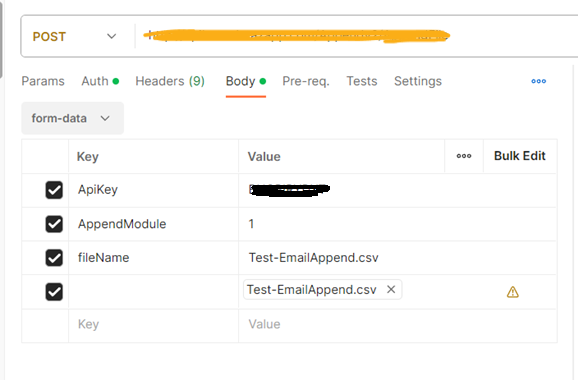
RequestjQuery Sample : var form = new FormData(); form.append("ApiKey", ""); form.append("AppendModule", "1"); form.append("fileName", "Test-EmailAppend.csv"); form.append("file", fileInput.files[0], "/Z:/Test Files/Test-EmailAppend.csv"); var settings = { "url": " ", "method": "POST", "timeout": 0, "processData": false, "mimeType": "multipart/form-data", "contentType": false, "data": form }; $.ajax(settings).done(function (response) { console.log(response); });
| Parameter | Required | Description | Type |
|---|---|---|---|
| APIKey | required | Issued by sales support or Datazapp Admin | String |
| AppendModule | required | Value should be 1 | String |
| File Name | required | Name of file | String |
| file | required | File data attached in form (input file should have following column name
format) First,Last,Address,State,ZIP |
[filestream] |
Response
Query Parameters
| Field | Type | Description |
|---|---|---|
| Following Parameters Should be send in Header: | ||
| Status | Integer | Indicate header status |
| Message | String | Indicate type of error |
| Following Parameters Should be send in ResponseDetails: | ||
| App | ||
| Token | String | System generated reference. |
| OrderAmount | String | Amount of count |
| Count | String | Number of count |
| Message | String | Null |
| ProcessedTime | String | Processing time |
| Status | String | True |
| Message | String | True |

File Append Status API Request
< API Endpoint :-datazapp api endpoint URL>This API requests for status of requested Email Append File. In return, it will share file status and if the file is processed, it will include order amount and current balance.
Sample Request
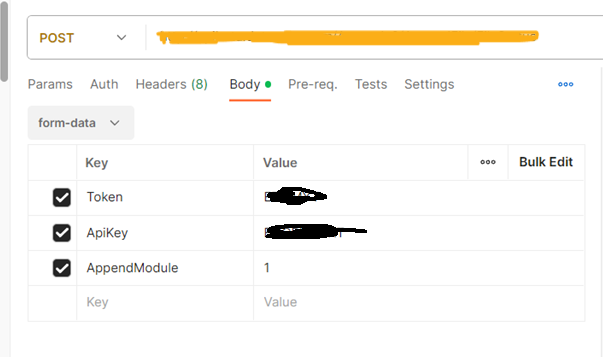
RequestjQuery Sample : var form = new FormData(); form.append("Token", "Reference token"); form.append("ApiKey", "Your API Key"); form.append("AppendModule", "1"); var settings = { "url": "", "method": "POST", "timeout": 0, "processData": false, "mimeType": "multipart/form-data", "contentType": false, "data": form }; $.ajax(settings).done(function (response) { console.log(response); });
| Parameter | Required | Description | Type |
|---|---|---|---|
| APIKey | required | Issued by sales support or Datazapp Admin | String |
| AppendModule | required | Value should be 1 | String |
| Token | required | File Request reference Token returned | String |
Sample Response (file in Process)

Sample Response (file is completed)

Response Description
Query Parameters
| Field | Type | Description |
|---|---|---|
| Following Parameters Should be send in Header: | ||
| Status | Integer | Indicate header status |
| Message | String | Indicate type of error |
| Following Parameters Should be send in ResponseDetails: | ||
| Token | String | File Request reference Token returned |
| OrderAmount | String | Amount of count |
| Count | String | Number of count |
| Message | String | Null |
| Status | String | True |
| Message | String | True |
File Append Download API Request
< API Endpoint :-datazapp api endpoint URL>This API requests to purchase and download requested Email Append File with an option to include only verified emails. If the user has enough balance to purchase the requested file, API will process the request, deduct the order amount from his Datazapp Balance and return the file in response.
Sample Request
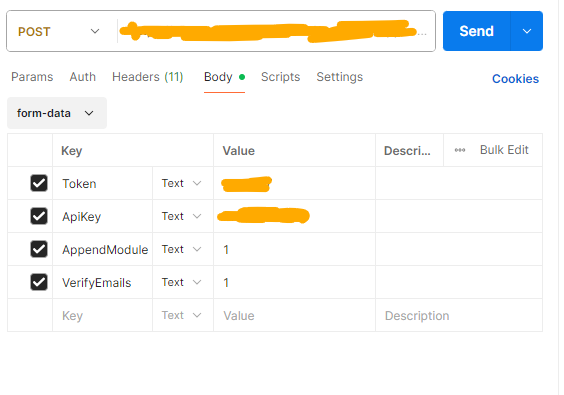
RequestjQuery Sample : jQuery Sample : var form = new FormData(); form.append("Token", "Reference token"); form.append("ApiKey", "Your API Key"); form.append("AppendModule", "1"); var settings = { "url": "", "method": "POST", "timeout": 0, "processData": false, "mimeType": "multipart/form-data", "contentType": false, "data": form }; $.ajax(settings).done(function (response) { console.log(response); });
| Parameter | Required | Description | Type |
|---|---|---|---|
| APIKey | required | Issued by sales support or Datazapp Admin | String |
| AppendModule | required | Value should be 1 | String |
| Token | required | File Request reference Token returned | String |
| VerifyEmails | Optional | 1 = Enable verification (recommended) 0 = Skip verification |
String |
Response

Response Description
Response will be containing CSV file as content-type ‘application/octet-stream’ and content-disposition will have file name.
Errors
The API uses the following error codes:
| Error Code | Meaning |
|---|---|
| Module does not exist. | The specified module does not exist or Invalid AppendModule Name. |
| User not found. | Invalid API Key or The user associated with the API key was not found |
| Getting 401 Error. | The user does not have access to this API |
| Append Request not found | Invalid Token: The specified append request could not be found |
| Improper JSON Data. Please check. | The JSON data in the request does not match the expected format. |
| It seems like API has an issue. Please contact Support. | There is an issue with the API. Contact the [email protected] |